Cold email + LinkedIn outreach
Cold email for markets you can't afford to burn.
Automate email and LinkedIn outreach with follow-ups that stop on reply, sending limits you control, and inbox rotation built in.
Free for 14 days. Built for your whole team.


 QuickMailExample campaign
 Will WangFounder, Growth Labz
"I've tested out every single email outreach platform... I've never found anything that replicates the results we get from QuickMail."Will's story
The whole outreach workflow
Run email and LinkedIn outreach
from one workspace.
From your first message to your next meeting, keep the moving parts in one place.
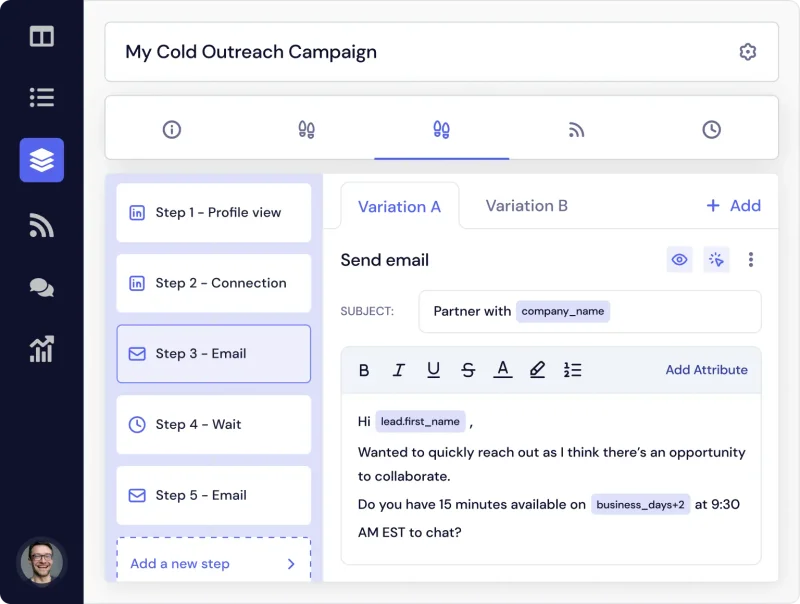
Build email and LinkedIn
into one sequence.
Make each message relevant with custom attributes, then let follow-ups happen when there's no reply.
- Personalize beyond the first name
- Choose the timing of every touch
- Find stronger messages with A/Z testing
Good outreach starts
with a healthy inbox.
Your message needs a chance to be read. Deliverability AI, inbox rotation, and blacklist monitoring help keep your sending setup healthy in the background.
- Distribute sending across your inboxes
- Keep individual sender performance in view
- Control daily limits and sending pace
Inbox rotation spreads the sending load.
Keep your best-performing senders in the rotation.
Stay close to changes in your sending setup.
You decide how much goes out, and when.
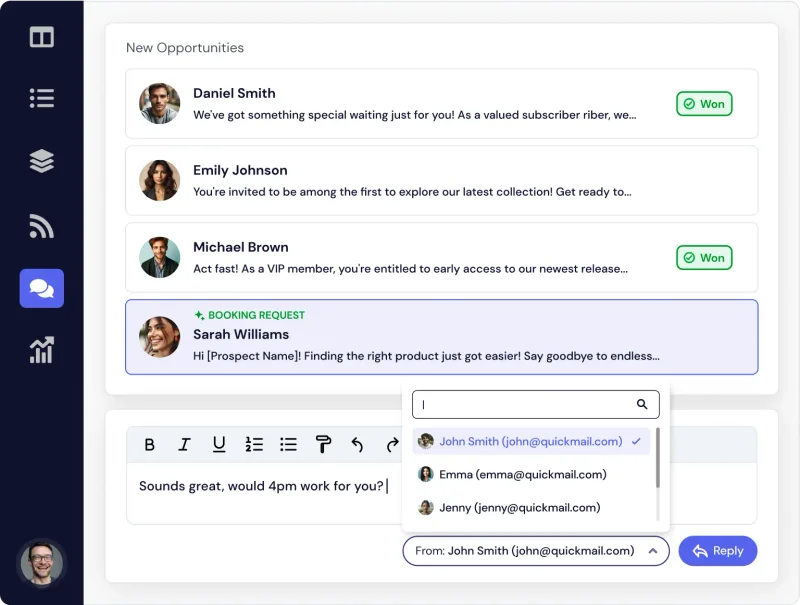
Two channels.
One conversation hub.
Email and LinkedIn replies come back to one shared inbox. Give your team the context to pick up the conversation and turn interest into the next step.
- Keep conversations together
- Bring your whole team, at no extra seat cost
- See what's working with campaign analytics
Scroll to follow the workflow
Built into their growth
How LinkedHacker
grew with QuickMail.
clients in 12 months at LinkedHacker.
Read Lee's story"In 12 months we've grown from ~100 clients to 220 clients...QuickMail has been pivotal in helping us do that."
 Lee BettsLead Gen Agency Owner
Results from the LinkedHacker customer story.
Fits the way you work
Connect outreach
to the rest of your workflow.
Keep leads and conversations moving between QuickMail and the tools your team already uses. Connect HubSpot, Pipedrive, Google Drive, Zapier, or build with our API.
Find your integrationsOutreach your team
can run together.
Bring prospecting, follow-ups, and conversations into a workflow your whole team can use.
QuickMail for your team For agenciesOne workspace.
Every client's campaigns.
Run client campaigns, protect their senders, and keep your people in sync from one agency workspace.
QuickMail for agenciesCan I use email and LinkedIn together?
Yes. Build email and LinkedIn steps into the same campaign and choose the timing between each touch. Replies from both channels come back to one inbox.
Will QuickMail work with my email provider?
QuickMail supports Gmail, Outlook, and other email providers. Connect your sending accounts and set the daily limits and pace that fit your outreach.
How does it help with deliverability?
Inbox rotation, Deliverability AI, and blacklist monitoring help you manage the health of your sending setup. Daily sending limits and variable delays keep you in control of volume and pacing.
Can my team or agency use it together?
Unlimited team members are included at no extra seat cost. Agencies can bring client workspaces together, assign team access, and see campaign performance from an agency dashboard.
Can I try QuickMail before choosing a plan?
Yes. Start with a free 14-day trial to put QuickMail to work with your own outreach. Start your trial or compare the plans.
Your 14-day free trial
Try your next campaign
in QuickMail.
Connect your inbox and build your first sequence.