Email deliverability
We Take Care of Your Deliverability
Your next conversation starts in the inbox. Keep your senders warm, share the load, and let QuickMail watch for inboxes that need a rest.
14 days to put it to work.
Built into your sending routine
Good outreach deserves a way in.
A thoughtful message still needs to reach someone. QuickMail brings warmup, inbox rotation, and sender health into the same workflow as your campaigns.
Give every inbox room to work. See which senders need attention. Keep building conversations, campaign after campaign.
Automated warmup
A little warmth.
Every day.
Build your sending routine before the first campaign. Keep warmup working in the background while your outreach runs.
- Premium auto warmer for inboxes purchased through QuickMail
- Mailflow warmup for inboxes you bring yourself

Inbox rotation
More room to send.
Share the load.
Run one campaign across multiple inboxes. QuickMail rotates sending between the accounts you choose, so growth doesn't mean pushing one inbox harder.
- Multiple senders in the same campaign
- Sending limits that stay in your control

Stealth mode
Your message.
A smaller footprint.
Google inboxes purchased through QuickMail each send through their own Gmail API connection. There is no shared QuickMail sending-app signature.
Stealth mode is on automatically for those inboxes. Your content and open-tracking settings remain your choices.
Explore deliverability features
Deliverability AI
Weak sender out.
A ready sender in.
QuickMail checks sender performance daily. Underperforming inboxes move into recovery, while eligible replacements in the same smart sending group take their place.
Keep spare, warmed inboxes in your smart sending groups so replacements are ready when you need them.
Meet Deliverability AI
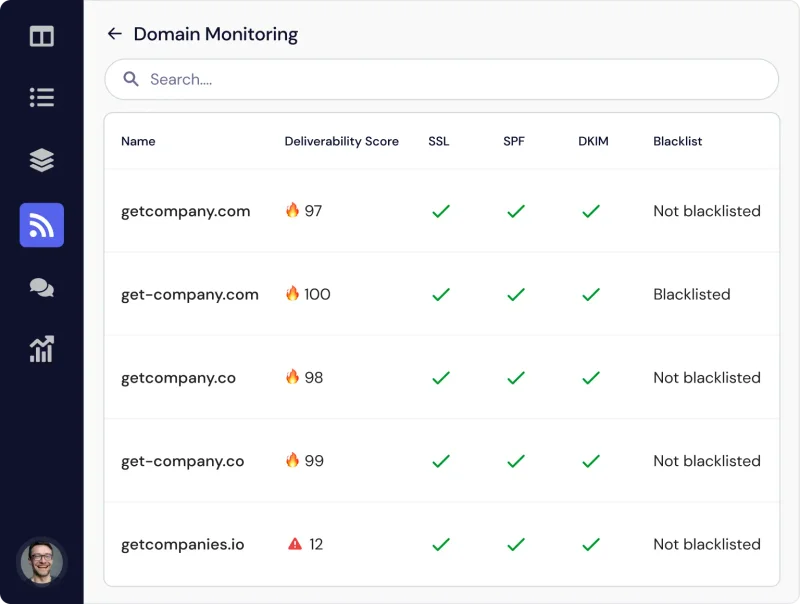
Domain health monitoring
Know what needs
your attention.
Keep SPF, DKIM, blacklist results, and deliverability scores in view. Spot the domain or inbox that needs a closer look before you plan your next send.
- AuthenticationSPF & DKIM checks
- ReputationBlacklist monitoring
- PerformancePer-inbox deliverability scores
Why agencies choose QuickMail
"I got great insights into whether my emails were actually reaching inboxes or landing in spam."

A few things to know
Your inboxes.
Your questions.
Get to know the tools behind your sending routine.
Can I bring my existing email accounts?
Yes. Connect your existing Gmail, Outlook, or other supported email accounts to QuickMail. Externally supplied inboxes can use Mailflow for warmup. The premium auto warmer is available for inboxes purchased through QuickMail.
Can warmup keep running during campaigns?
Yes. Warmup can run alongside your outreach. Keep it as part of your sending routine, together with sensible sending limits and regular checks on sender performance.
How does Deliverability AI replace a sender?
It reviews performance daily and swaps underperforming senders for eligible replacements in the same smart sending group. Keep spare, warmed inboxes in the group so they are ready to take over while other senders recover.
Does Stealth mode apply to every inbox?
Stealth mode is automatically enabled for Google inboxes purchased through QuickMail. Each uses its own Gmail API connection. It doesn't apply to every connected account, and it doesn't replace decisions about your content, sending volume, or tracking.
Will this guarantee that every email reaches the inbox?
Mailbox providers decide where messages land. QuickMail gives you warmup, rotation, monitoring, and sender recovery tools to support deliverability. Your list quality, authentication, message content, and sending habits also matter.
Your next conversation is out there
Give your next campaign
a healthier start.
Bring your inboxes. Build your campaign. Put QuickMail's deliverability tools to work.
Start my free trial Try QuickMail free for 14 days.