
Two years ago, we shared our top picks for cold email software. Since then, prices have changed, platforms have expanded, and some familiar tools have disappeared. We’ve revisited the list for 2026 with current plans, clearer comparisons, and more options to consider. Enjoy!
Cold email software helps you send personalized messages, schedule follow-ups, and manage the replies. The right choice depends on how you work: a founder sending from Gmail needs something different from an agency managing campaigns for several clients.
This guide covers 18 sending and sales platforms, plus six supporting tools for deliverability, prospect research, verification, video, and automation. Those supporting tools complement a campaign sender; their jobs and costs are different.
We build QuickMail, and it’s our top pick for teams that want to manage outreach and replies across multiple inboxes. The comparisons below use vendors’ published features and pricing to help you decide which tools fit your workflow.
Pricing checked October 30, 2026. Prices are in USD unless stated otherwise. Monthly billing and annual commitments are labeled separately. Mailboxes, domains, data credits, calling, and other add-ons can increase your total cost, so check the linked pricing pages before purchasing.
- Features to Look For in Cold Email Software
- Our Top Pick for Cold Email Software in 2026
- 7 Alternative Cold Email Platforms
- 6 Sales Platforms with Email Outreach
- 4 Tools for Outreach from Your Inbox
- 6 Supporting Tools for Your Campaigns
- Which Cold Email Tools Have Free Plans?
- Cold Email Software FAQ
Best Cold Email Software - Top Picks
Start with your main use case, then compare the limits of the plan you would actually buy.
| Use case | Our pick | Pricing and limits to compare |
|---|---|---|
| Team outreach across multiple inboxes | QuickMail | $49/month for 5,000 sends and 1,000 uploaded contacts; unlimited senders and users |
| Email outreach with a separate prospecting credit system | Instantly | Growth outreach: $47/month; lead data and other products have separate pricing |
| Campaigns with a centralized master inbox | Smartlead | Base: $39/month for 6,000 sends and 2,000 contacts |
| Email, LinkedIn, and calling in one workflow | lemlist | Multichannel: $109/user/month, or $87/user/month billed annually |
| Prospecting data alongside email sequences | Apollo | Free and paid plans; compare data credits, sending access, and user costs |
| Automated follow-ups inside Gmail | GMass | Premium: $39.95/month; Standard does not include sequences |
| A sales CRM with automated outreach workflows | Close | Growth: $109/user/month, or $99/user/month billed annually |
For QuickMail, you can start a free 14-day trial to try the campaign editor and reply handling with your own workflow.
Features to Look For in Cold Email Software
Reliable Sequences and Follow-Up Controls
Look for flexible sending schedules, time zone controls, daily limits, and automatic stops when someone replies or opts out. Check how the tool handles bounces, out-of-office messages, and the same prospect appearing in more than one campaign.
If you use several inboxes, test how easy it is to add them to a campaign and manage their limits. A plan’s monthly sending allowance is a billing limit, not a recommended target for each mailbox.
Personalization You Can Check Before Sending
Custom fields, conditional text, and preview tools help you write personalized cold emails. Useful personalization explains why your offer matters to that recipient; inserting a first name is only a starting point.
AI can help draft messages and summarize research. Review its claims before sending, especially references to a prospect’s job, company news, or business problems. A confident but incorrect opening line can undermine the whole conversation.
Reply Handling and Team Collaboration
Sending is only part of the job. If several people handle responses, look for a shared inbox, assignments, notes, and a clear view of which conversations need attention.
Agencies should also check client workspaces, permissions, reporting, and the cost of adding another client or team member. An inexpensive entry plan can become expensive when each new user or workspace carries a fee.
Authentication, Opt-Outs, and Deliverability Monitoring
Your software should help you monitor sending problems and respect opt-outs. Your domain and mailbox configuration matter too.
For personal Gmail recipients, Google requires SPF or DKIM for all senders. Bulk senders must meet additional requirements, including SPF, DKIM, DMARC, and one-click unsubscribe for marketing and subscribed messages. Google also requires reported spam rates below 0.3%. Read Google’s sender guidelines for the full requirements and scope.
Microsoft also explains how SPF, DKIM, and DMARC work together to authenticate email. Choose software that works with properly configured mailboxes and gives you visibility into failures.
Warm-up tools can be part of your setup, but a warm-up score does not guarantee inbox placement. Evaluate results using delivery errors, bounces, complaints where available, and real prospect responses. See our deliverability guide for more detail.
Reporting That Helps You Improve Results
Compare positive replies, qualified conversations, meetings, and opportunities against your campaign goals. Use open and click data as supporting signals: privacy protections and automated security checks can make those numbers misleading.
A/B testing is useful when you change one meaningful variable and have enough responses to learn from the result. More email variants alone will not fix a weak offer or an unsuitable prospect list.
The Full Cost of Your Setup
Compare these separately: users, connected mailboxes, uploaded contacts, active prospects, monthly sends, verification credits, enrichment credits, and client workspaces. Vendors use different definitions for each.
Also check which tier includes automatic follow-ups, inbox rotation, API access, CRM integrations, and reply management. The cheapest plan may not include the feature that brought you to the product.
Our Top Pick for Cold Email Software in 2026
1. QuickMail - Team Outreach and Reply Management
Best for: Agencies and sales teams that want to run campaigns across multiple inboxes and handle responses together.
QuickMail combines personalized sequences, inbox rotation, and a centralized view of prospect conversations. You can add senders to an existing campaign, keeping your sequence and reporting together rather than creating another campaign for each inbox. See how inbox rotation works.
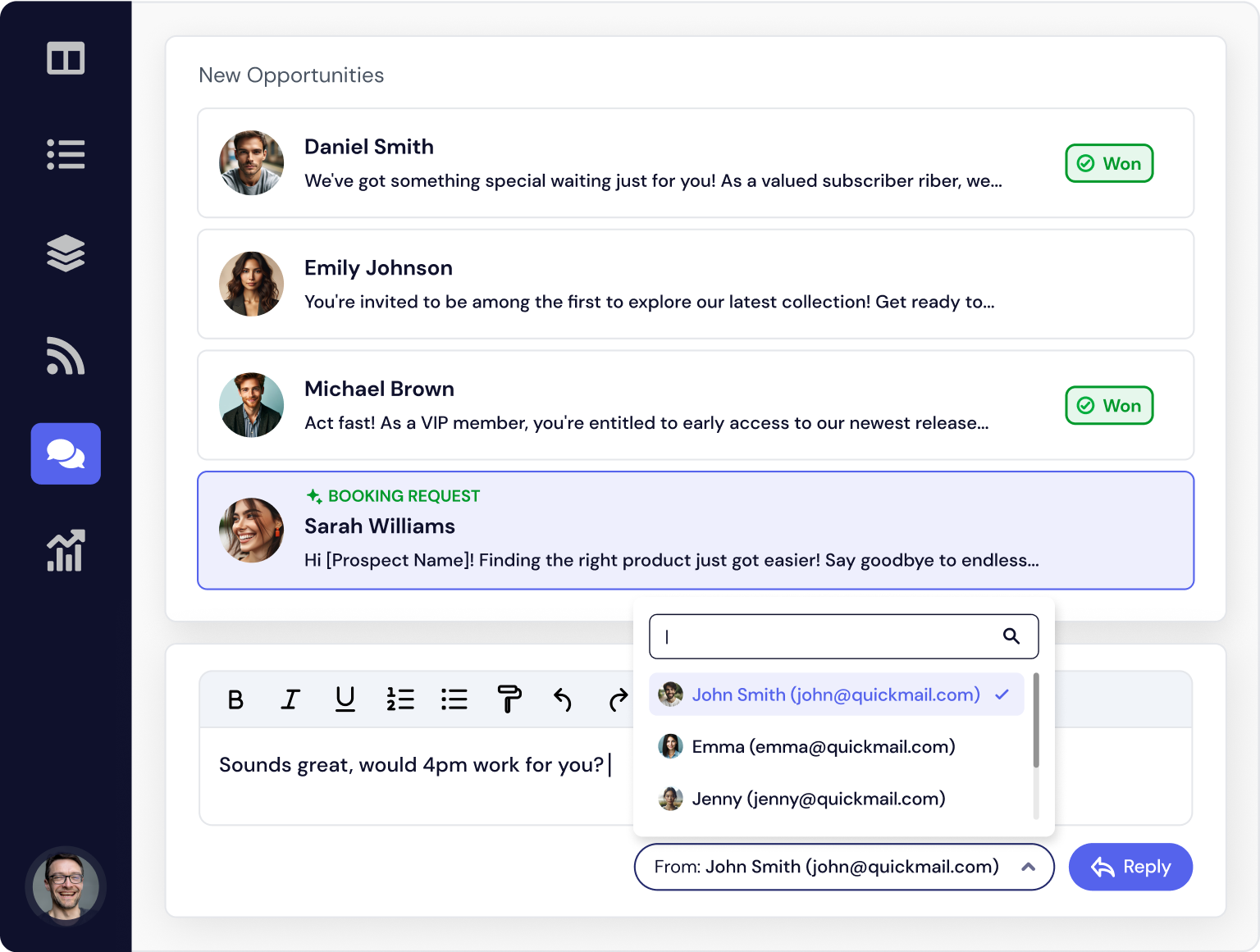
Handle Replies as a Team
The shared inbox brings prospect conversations together, including new threads and messages where you’re copied. Team members can assign conversations and respond from the connected inboxes.
QuickMail’s AI features help categorize replies, handle unsubscribe requests, and recognize out-of-office responses. That gives your team more time to follow up with interested prospects. Explore QuickMail’s reply handling.
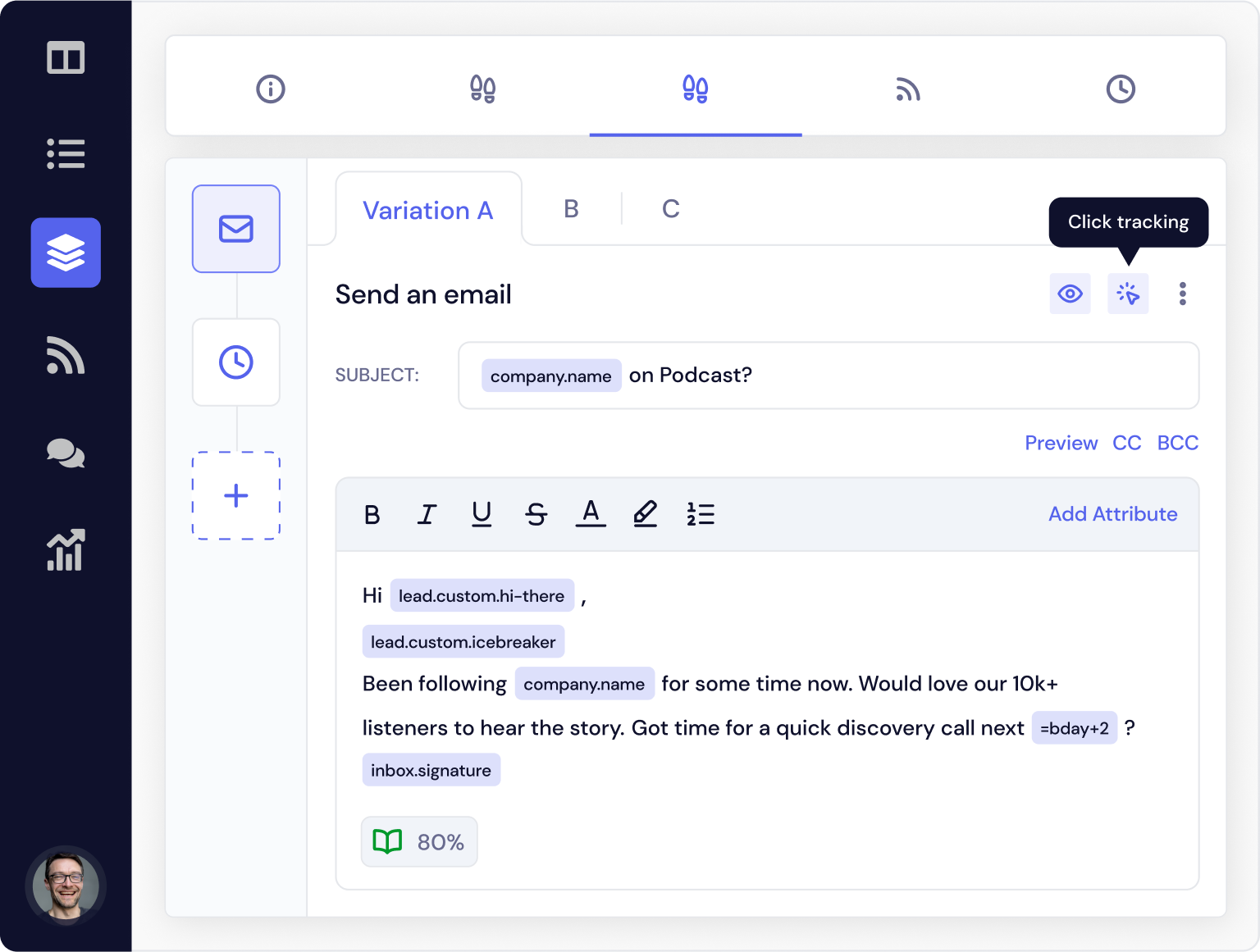
Control Sending and Personalization
Custom attributes and conditional sending logic help tailor your sequences. Scheduling controls let you choose sending days and times, while the MailFlow integration provides warm-up and monitoring features. QuickMail also offers controls for open and click tracking. Explore the outreach features.
Current Pricing
QuickMail’s published plans include unlimited email senders, LinkedIn accounts, and users:
- Starter: $49/month for one workspace, 1,000 uploaded contacts, and 5,000 emails sent per month.
- Growth: $99/month for one workspace, 25,000 uploaded contacts, and 100,000 emails sent per month, with API access.
- Agency: $299/month for two workspaces, 100,000 uploaded contacts, and 500,000 emails sent per month, with API and webhooks. Additional workspaces cost $49 each.
All three plans list a free MailFlow AutoWarmer integration and a 14-day trial. Sending mailbox subscriptions and domains are separate costs.
Pros:
- Unlimited users and senders on every plan simplify budgeting for a team.
- Inbox rotation and shared reply handling support campaigns across multiple mailboxes.
- Separate agency workspaces help organize client campaigns.
Cons:
- Uploaded contacts and monthly sends are capped by plan.
- API access starts on Growth; webhooks and additional workspace options require Agency.
- You still need to source your prospects and provide sending mailboxes.
7 Alternative Cold Email Platforms
2. Instantly - Email Campaigns with Optional Prospecting Tools
Best for: Teams that want email sending and warm-up, with the option to add lead data and AI tools.
Instantly’s outreach product supports multiple connected email accounts and automated campaigns. Its pricing also separates outreach from credit-based prospecting and other products, so compare the complete setup you need.
Pricing: Growth outreach is $47/month for 1,000 uploaded contacts and 5,000 monthly emails, with unlimited connected email accounts and warm-up. Data credits and bundles are priced separately. See Instantly’s plans.
Pros:
- Unlimited account connections on the entry outreach plan.
- You can add prospecting and research capabilities as your process grows.
Cons:
- Unlimited mailbox connections do not mean unlimited sends or uploaded contacts.
- Check the tier needed for Unibox reply management and advanced features; separate products can increase the bill.
3. Smartlead - Campaigns with a Master Inbox
Best for: Teams that want to coordinate multiple sending accounts and manage replies in one place.
Smartlead offers campaign sending, warm-up, and a Master Inbox for categorizing and assigning responses. It also offers infrastructure, prospecting, and other services alongside the core software.
Pricing: Base is $39/month for 2,000 contacts and 6,000 email sends. Pro is $94/month for 30,000 contacts and 90,000 sends. Verification and other add-ons have their own pricing. Compare Smartlead’s plans.
Pros:
- Centralized reply handling is useful when several inboxes are involved.
- Multiple service and infrastructure options can support a larger outbound operation.
Cons:
- Compare the core subscription with the add-ons you need, including client access and infrastructure.
- Entry-level contact and sending limits may require an early upgrade.
4. lemlist - Multichannel Prospecting
Best for: Sales teams combining email, LinkedIn, and calling in their prospecting process.
lemlist offers email sequences, personalization, lead research, and a separate Multichannel plan. That plan adds LinkedIn automation, SMS automation, and a built-in call dialer; some channels and data services carry additional costs.
Pricing: Email starts at $69/month, or $55/month billed annually, for 50,000 monthly emails with unlimited users and email senders. Multichannel starts at $109 per user/month, or $87 billed annually, and includes five senders per user. See lemlist’s pricing.
Pros:
- A good shortlist option when your workflow spans several channels.
- Research, personalization, and sending features sit in the same platform.
Cons:
- Email and Multichannel use different pricing models; compare your actual team setup.
- Data enrichment, calling usage, and channel add-ons can add costs.
5. Saleshandy - Standalone Outreach with Prospecting Data
Best for: Teams looking for campaign sending, a unified inbox, and lead data in one subscription.
Saleshandy belongs among standalone outreach platforms. Its current plans combine email sequences, sender rotation, a unified inbox, warm-up, and prospecting credits. It should no longer be evaluated only as a Chrome extension.
Pricing: Starter is $41/month, or $34/month billed annually. It lists 2,000 active prospects, 6,000 monthly emails, unlimited email account connections, sender rotation across 10 accounts, and one user. Pro is $99/month, or $76 billed annually. Compare Saleshandy’s current limits.
Pros:
- Sending, reply management, and lead data are available together.
- No per-inbox connection charge on the listed plans.
Cons:
- Connected accounts, rotation limits, and user allowances are different measures.
- Starter’s single user and lower campaign limits may not suit a team.
6. Reply.io - Email and Multichannel Sales Engagement
Best for: Teams comparing email-only outreach with a broader sales engagement workflow.
Reply.io offers Email Volume and Multichannel subscriptions, alongside agency and AI SDR options. Its feature comparison includes sequences, reply categorization, inbox rotation, and CRM integrations.
Pricing: Email Volume starts at $59/month on monthly billing; Multichannel starts at $99 per user/month. Annual rates and included usage differ. LinkedIn automation, calling, and validation can be additional purchases depending on the plan. Check Reply.io’s pricing.
Pros:
- Separate email and multichannel options let you choose around your sales process.
- Team workflows and integrations extend beyond basic mail merge.
Cons:
- Volume, users, and channel allowances need comparing together.
- AI SDR and agency offerings have different costs from the entry subscriptions.
7. Snov.io - Email Finding, Verification, and Outreach
Best for: Teams that want to find and verify contacts before adding them to sequences.
Snov.io combines prospect search, email verification, sequences, warm-up, and a CRM. Its quotas distinguish data credits, recipients, enrichment tokens, and warm-up slots.
Pricing: Starter is $39/month, or $29.25/month billed annually. It includes 1,000 credits, 5,000 recipients, three warm-up slots, and unlimited team seats. LinkedIn automation slots cost extra. See Snov.io’s plans.
Pros:
- Prospecting and verification fit into the same workflow as sending.
- Recipient-based limits allow follow-ups without charging for each one as a new recipient.
Cons:
- Data credits and recipient allowances are separate; using one does not increase the other.
- Warm-up capacity and LinkedIn account slots need their own budget check.
8. Mailshake - Email Outreach with a Calling Upgrade
Best for: Teams starting with sequences and considering a dialer later.
Mailshake offers automated sequences, A/B testing, and AI writing tools. Its Email Outreach tier adds rotation and a unified inbox; Sales Engagement adds calling features.
Pricing: Monthly plans are Starter at $29, Email Outreach at $49, and Sales Engagement at $99. Annual billing brings those to $25, $45, and $85 per month. Starter includes one email address and 1,500 monthly sends. Compare Mailshake’s plans.
Pros:
- A clear upgrade path from basic sequences to a broader sales workflow.
- Email Outreach includes CRM integrations and shared reply visibility.
Cons:
- Inbox rotation and the unified inbox are above the Starter tier.
- Connected address allowances vary by plan, so price your full mailbox setup.
6 Sales Platforms with Email Outreach
These products make sense when prospect data, CRM records, rep tasks, or revenue reporting need to live alongside email. Compare their outreach features with the broader system you would be buying.
9. Apollo - Prospecting Data and Sales Sequences
Best for: Sales teams that want a contact database and email sequencing together.
Apollo combines data search, enrichment, sales engagement, and integrations. Its Basic plan includes email sequencing and core integrations; higher plans add capabilities for more intensive prospecting and larger teams.
Pricing: Free, Basic, Professional, and Custom options are listed. Check the live comparison for the applicable subscription rate, data credits, and sending access. See Apollo’s plans.
Pros:
- Researching contacts and enrolling them in sequences can happen in one system.
- A free option lets you explore the product before paying.
Cons:
- Compare access to contact data separately from sending features and user allowances.
- You may be buying more functionality than you need if your list and CRM are already in place.
10. Salesmate - CRM with Email Sequences
Best for: Smaller sales teams that need pipeline management as well as outreach.
Salesmate combines contact management, deal pipelines, email sync, tasks, and sales automation. Sequences and a team inbox are listed on Pro, rather than the entry Basic plan.
Pricing: Basic is listed at $23 per user/month and Pro at $39 per user/month with annual billing. Check monthly rates and automation credit allowances for your setup. See Salesmate’s pricing.
Pros:
- Follow prospect conversations through to deals in the same CRM.
- Pro combines sequences with team collaboration features.
Cons:
- Basic’s lower price does not include the same sequence features as Pro.
- Per-user pricing and automation quotas matter as your team grows.
11. Klenty - Outreach Connected to Your CRM
Best for: Sales teams choosing between email outreach and a broader CRM-connected engagement platform.
Klenty offers email sequences, personalization, deliverability tools, and CRM synchronization. Its plans distinguish an email-focused Starter subscription from Growth and higher sales engagement tiers.
Pricing: Starter begins at $50/month billed annually, with unlimited users and mailboxes. Growth is $70 per user/month billed annually. Check the current plan comparison.
Pros:
- An email-focused entry option sits alongside broader sales engagement features.
- CRM synchronization can help keep rep activity and prospect records aligned.
Cons:
- Starter and Growth use different billing units, so compare the total for your team.
- Calling, advanced CRM features, and higher usage may require a different plan or add-on.
12. Outreach - Sales Engagement for Larger Revenue Teams
Best for: Organizations looking for sales engagement alongside deal management, coaching, or forecasting.
Outreach’s current offering extends beyond sequences into a broader revenue platform with AI agents. That makes the package, integrations, and implementation requirements important parts of the purchase.
Pricing: Custom quotes. The pricing page lists packages and AI credits rather than a public entry subscription rate. Request Outreach pricing.
Pros:
- Broader capabilities can suit organizations coordinating several sales roles.
- Packages can be scoped around the team’s revenue workflow.
Cons:
- You need a quote to make a meaningful cost comparison.
- Buying and configuring a broader revenue platform is more work than adopting a basic sender.
13. Salesloft - Coordinated Sales Engagement
Best for: Sales organizations that want structured prospecting alongside other revenue workflows.
Salesloft’s Cadence product helps teams organize prospecting activities. Its current platform also lists Conversation Intelligence, Deals, and Clari Forecast. Evaluate how its engagement tools fit your CRM and the other revenue workflows you need to support.
Pricing: Contact the sales team for a package and quote. Confirm the modules, user minimums, implementation costs, and contract terms included in the proposal. Talk to Salesloft.
Pros:
- Worth evaluating when a shared sales process matters more than standalone sending.
- A sales consultation lets you assess the wider platform against your requirements.
Cons:
- A public monthly starting price is not available on the linked sales page.
- The broader product scope may be unnecessary for a small email-only operation.
14. Close - CRM with Calling and Automated Workflows
Best for: Sales teams that want calls, emails, SMS, and deal management in one CRM.
Close brings sales communication into contact and pipeline records. For automated outreach, pay particular attention to which plan includes Workflows: Solo and Essentials do not.
Pricing: Essentials is $49 per user/month, or $35 billed annually. Growth, which adds automated workflows, is $109 per user/month, or $99 billed annually. Calling and SMS usage can carry additional costs. Compare Close’s plans.
Pros:
- Communication and deal history stay together in the CRM.
- Growth combines workflow automation with the broader sales toolkit.
Cons:
- The cheapest subscriptions do not include automated workflows.
- Per-user charges and communication usage need budgeting alongside the base plan.
4 Tools for Outreach from Your Inbox
Inbox-based tools can suit people who spend most of their day in Gmail or Outlook. They still have subscription limits, and your sending provider’s rules continue to apply. Check account compatibility and the cost of campaign automation before installing.
15. GMass - Sequences Inside Gmail
Best for: Gmail users who want mail merge, automatic follow-ups, and Google Sheets-driven campaigns.
GMass runs in Gmail through a Chrome extension. It offers personalization, verification, and campaign tools, but the plan you choose determines whether you get sequences, A/B testing, and MultiSend inbox rotation.
Pricing: The January 2026 price update set monthly Standard at $29.95, Premium at $39.95, and Professional at $59.95. Premium adds automated follow-ups; Professional adds MultiSend. Annual subscriptions have lower effective monthly prices. Read the 2026 pricing update and compare current features.
Pros:
- A familiar workflow if Gmail and Google Sheets already hold your campaign data.
- More advanced sending options than a basic one-off mail merge.
Cons:
- Gmail-focused; it is not an Outlook workflow.
- Standard’s entry price excludes automated follow-ups and inbox rotation.
16. Streak - CRM and Mail Merge in Gmail
Best for: Gmail users who want to track deals in shared pipelines while sending personalized messages.
Streak combines a CRM inside Gmail with email power tools. Its free offering is useful for light mail merge, while the paid subscriptions add CRM and team capabilities.
Pricing: Free email tools include mail merge for up to 50 messages per day. Pro is $59 per user/month, or $49 billed annually; Pro+ is $89 per user/month, or $69 billed annually. See Streak’s plans.
Pros:
- Shared pipelines keep context close to your email conversations.
- Free email tools offer a way to begin with small batches.
Cons:
- Free email tools are different from a full free team CRM.
- Automations and integrations require comparing Pro+ with the lower tier.
17. Mixmax - Inbox Productivity and Sequences
Best for: Reps who want scheduling, tracking, and automated follow-up close to their email workflow.
Mixmax’s current pricing is tied to how many recipients you add to automated outreach each month. Compare recipient volume as well as the number of users, especially if you are working from an older seat-only price comparison.
Pricing: The free tier lists 50 recipients per month with limited features. Paid plans start at $29 per user/month billed yearly for 100 recipients per month. Higher recipient allowances have different prices. See Mixmax’s pricing.
Pros:
- Scheduling and sequence tools support a rep’s day-to-day outreach workflow.
- A free tier is available for occasional use.
Cons:
- The advertised starting price comes with a small recipient allowance.
- Budget using both recipients and users, rather than seats alone.
18. Yesware - Inbox Tracking with Campaign Upgrades
Best for: Sales reps who want email tracking and campaigns, particularly when Salesforce integration matters.
Yesware offers tracking, a meeting scheduler, and campaign tools. Its free and Pro tiers have small campaign recipient allowances; Premium and Enterprise are more relevant for sustained outreach.
Pricing: Monthly plans are Pro at $19 per seat, Premium at $45, and Enterprise at $85. Annual Pro and Premium rates are $15 and $35 per seat/month. Enterprise adds Salesforce features. Compare Yesware’s plans and campaign limits.
Pros:
- Useful when email productivity and tracking are part of the buying decision.
- Salesforce integration is available on the Enterprise tier.
Cons:
- A low-cost tracking plan is not the same as a plan for larger campaigns.
- Salesforce requirements can move you to a higher-priced subscription.
6 Supporting Tools for Your Campaigns
These tools help with specific parts of outreach. Buy them to solve a clear problem in your process, and include their costs when comparing your overall setup.
19. MailFlow - Warm-Up and Technical Checks
Best for: Monitoring mailbox setup and adding warm-up alongside a campaign sender.
MailFlow offers SPF and DKIM checks, warm-up, and monitoring features. It integrates with QuickMail, whose paid plans list a free AutoWarmer integration.
Pricing: MailFlow lists a Free Pool for up to 100 email addresses with up to five warm-up emails per address/day. Silver is $49/month and Gold is $99/month, with higher warm-up allowances and different monitoring and support features. Compare MailFlow’s pools.
Pros:
- A free entry option for technical checks and limited warm-up.
- A native integration keeps it close to QuickMail’s outreach workflow.
Cons:
- It does not replace your prospecting sequence software.
- Warm-up allowances, monitoring, and support vary; no score guarantees delivery to prospects’ inboxes.
20. Hunter - Email Finding and Verification
Best for: Finding business email addresses and checking them before outreach.
Hunter offers domain search, an email finder, verification, and outreach features. It is worth considering when sourcing contact information is a bigger gap than campaign sending.
Pricing: A free plan includes 50 credits per month. Paid subscriptions and bulk credits provide higher allowances; compare how searches and verification consume those credits. See Hunter’s plans.
Pros:
- Contact discovery and verification are available together.
- The free allowance can help you evaluate results for your target accounts.
Cons:
- Credit allowances need to cover your research and verification workload.
- Finding an address does not establish that a prospect is relevant or that outreach is permitted.
An update to the old list: Clearbit Connect is no longer a current recommendation. Clearbit says its free tools, including Connect, were retired on April 30, 2025.
21. NeverBounce - List Verification
Best for: Checking email addresses before importing a list into a campaign.
NeverBounce provides bulk and individual email verification. Its API supports list submissions and retrieving results, which can help automate list checking before sending.
Pricing: Verification uses credits. You can purchase credits in bulk or request monthly billing; the cost depends on your verification workload. See NeverBounce’s verification documentation.
Pros:
- Suitable for checking a list as part of campaign preparation.
- API access can fit verification into an automated workflow.
Cons:
- Verification costs sit alongside your campaign software and data costs.
- A valid mailbox result does not guarantee that a message will be welcomed or reach the inbox.
22. Clay - Prospect Research and Enrichment Workflows
Best for: Teams that need to combine multiple data providers and research target accounts before outreach.
Clay offers enrichment waterfalls, AI research through Claygent, and workflows for preparing prospect data. Its current offering also includes a sequencer and integrations with other sending platforms, so choose how it fits your existing system.
Pricing: A free plan is available. Paid Launch and Growth plans use actions and data credits, with annual discounts and configurable usage. Price the actions and data your workflow consumes separately. See Clay’s live plan comparison.
Pros:
- Flexible research and enrichment across several providers.
- Useful when a simple list of names and email addresses lacks the context your campaign needs.
Cons:
- Building and maintaining a research workflow adds work before launch.
- Actions, data credits, and external provider costs make budgeting more involved than a flat sender subscription.
23. Loom - Personal Video Messages
Best for: Recording a short explanation or demonstration for a specific prospect.
Loom lets you record your screen and camera and share a video link. In outreach, that can help explain something easier to show than describe, such as an observation about a prospect’s website.
Pricing: Loom offers a free Starter plan with recording and storage limits, plus paid Business and AI-enabled options. Compare Loom’s current plans.
Pros:
- A practical format for a brief demonstration or walkthrough.
- You can test video outreach using the free plan.
Cons:
- Recording individual videos takes time, so reserve them for suitable prospects.
- A video link adds another step for the recipient; test whether it helps your conversations.
24. Zapier - Automation Between Your Tools
Best for: Connecting your sender, CRM, spreadsheets, and team notifications.
Zapier connects apps through workflows called Zaps. For outreach, use it to move qualified replies into your CRM, notify the right teammate, or update a record after a campaign event. Check which triggers your sending tool exposes.
Pricing: Free and paid plans are available. Paid pricing scales with task usage, and features such as multi-step workflows and premium integrations depend on the plan. See Zapier’s pricing.
Pros:
- Can reduce repeated copying between tools you already use.
- Useful for connecting campaign outcomes with your sales process.
Cons:
- Busy workflows can consume tasks quickly.
- You need to monitor failed runs and duplicate events, especially when automations update CRM records.
Which Cold Email Tools Have Free Plans?
Free plans are useful for learning a product or running a small, focused workflow. Their allowances differ, and some free tools cover only one part of outreach.
| Tool | Free allowance or role | What to check |
|---|---|---|
| Snov.io | Non-expiring free plan with 50 credits and 100 campaign recipients | Premium integrations, teamwork, and other advanced features are restricted |
| Streak | Free email tools, including mail merge for up to 50 messages/day | Paid CRM features and your mailbox provider's limits |
| Mixmax | 50 recipients/month with limited features | Paid plans scale with recipient volume and users |
| Hunter | 50 credits/month for prospecting and verification | Credits and campaign sending allowances are different limits |
| MailFlow | A Free Pool for limited warm-up and technical checks | It is a supporting tool, so you still need a campaign sender |
QuickMail offers a 14-day trial. It is a way to evaluate the paid platform, rather than a permanent free sending plan.
Cold Email Software FAQ
What Is Cold Email Software?
Cold email software helps you send personalized outreach to new prospects and follow up with those who have not replied. Typical features include campaign schedules, personalization fields, reply detection, suppression lists, and reporting.
Some products focus on sending. Others add a contact database, CRM, calling, or research tools. Choose around the work you need to do, rather than the length of a feature list.
Should You Use Gmail or Outlook?
Compare support for the provider you use, authentication setup, connection methods, and the visibility your tool gives you into delivery problems. Neither provider guarantees better results for every campaign.
Your list quality, sending behavior, recipient engagement, and configuration all matter. See our guides to Gmail outreach and Outlook outreach.
How Many Cold Emails Can You Send per Day?
There is no universal daily allowance that guarantees good deliverability. Your software subscription, mailbox provider, account status, and sending reputation impose different constraints.
Start with a focused list and monitor results before increasing activity. Google’s sender guidelines explain that exceeding limits or failing requirements can lead to throttling, spam placement, or rejection. A platform’s advertised monthly allowance does not override your mailbox provider’s rules.
Can You Use an Email Marketing Platform Instead?
Check the provider’s acceptable-use and consent requirements before importing prospects. Newsletter software and cold outreach software often serve different workflows; having a mail merge feature does not establish permission to contact a list.
Read our guide to cold email versus email marketing for the differences. CRM products also vary: several in this list include prospecting sequences, so compare the specific product and plan.
Does Email Warm-Up Guarantee Deliverability?
No. Warm-up activity and monitoring can help you observe aspects of a mailbox’s setup and behavior, but they cannot guarantee placement for your actual campaign messages.
Keep your domains authenticated, verify addresses, target relevant people, respect opt-outs, and watch delivery errors and responses. Investigate a failing campaign before increasing its volume.
Is Cold Email Legal?
The answer depends on the recipient, jurisdiction, and message. Software features alone do not establish that an outreach campaign meets the applicable rules.
In the US, the FTC’s CAN-SPAM guide covers commercial email, including B2B messages. Requirements include accurate sender information, non-deceptive subject lines, appropriate advertising identification, a valid postal address, a working opt-out, and honoring opt-outs within 10 business days.
In the UK, the ICO’s B2B marketing guidance distinguishes corporate subscribers from sole traders and some partnerships. Consent rules differ, and data protection requirements can still apply to named business contacts. Check the rules for each market you contact; personalization by itself does not make a campaign compliant.
How Should You Test a Cold Email Tool?
Use the same small, relevant prospect sample and a consistent message to evaluate your workflow. Check:
- Whether imports and personalization previews catch missing or incorrect data.
- How schedules, sending limits, replies, bounces, and opt-outs are handled.
- Whether the right person sees and can respond to each conversation.
- Whether reporting answers your questions about positive replies and meetings.
- What the subscription would cost with your actual users, inboxes, contacts, and add-ons.
Treat any difference in reply rates cautiously: different prospect samples and sending conditions can affect the outcome.
Where Can You Find Cold Email Templates?
Start with our cold email template library, then adapt the message to your audience and offer. You can also use our examples for agencies, introductions, and networking.
A template should give you a useful structure. Replace generic claims with a concrete reason to contact that person and a question they can answer easily.
Getting Started with a Cold Email Tool
Shortlist two or three products based on your actual workflow. A Gmail extension may be enough for occasional outreach; a dedicated sender may fit a team managing multiple inboxes; a CRM-centered platform may make sense when calls and pipeline management are equally important.
For team outreach, try QuickMail free for 14 days. Connect your inbox, build a focused sequence, and test how your team handles the conversations it creates.